Fungible Tokens
Issuance of fungible ESDT tokens via Web Wallet on MultiversX
In this section you will learn how to mint tokens on MultiversX.
There are 2 types of tokens on MultiversX:
- Native tokens - EGLD;
- ESDT - eStandard Digital Token.
In the previous section you learnt how to mint xEGLD on MultiversX Testnet using Faucet option.
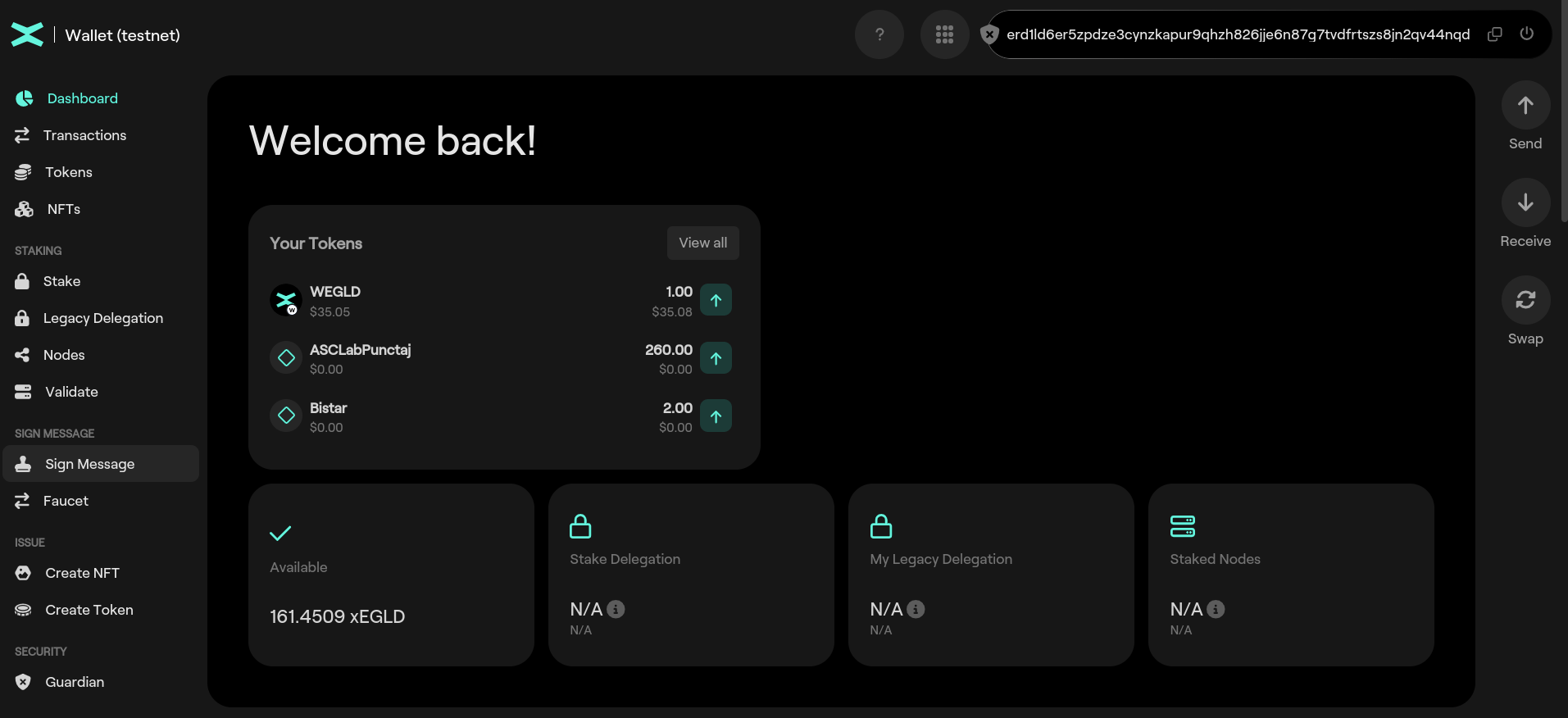
Mint ESDT via Web Wallet
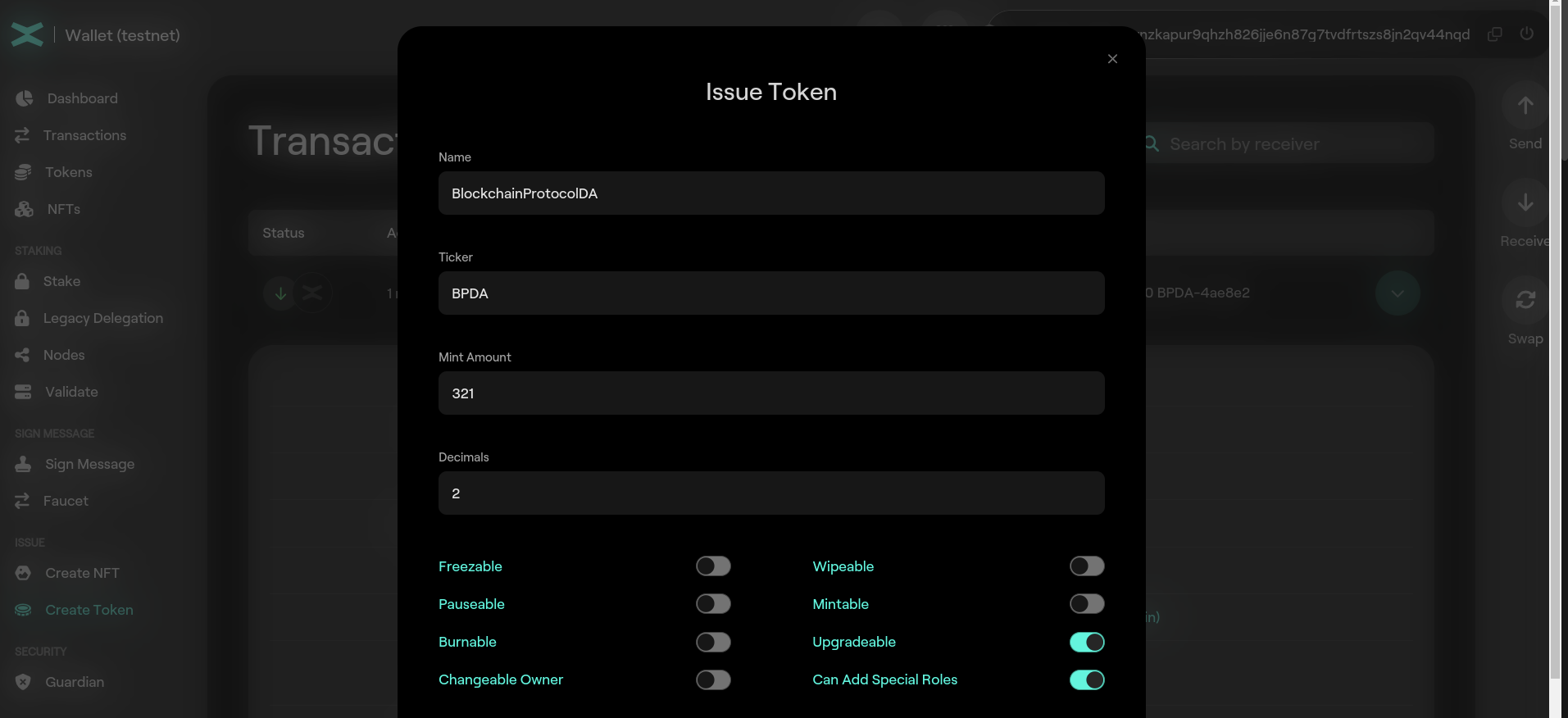
This time we use the Create Token option.
Token Name:
- length between 3 and 20 characters
- alphanumeric characters only
Token Ticker:
- length between 3 and 10 characters
- alphanumeric UPPERCASE only
Number of decimals:
- should be a numerical value between 0 and 18;
- there are no floats on the blockchain;
- a token with 3 decimals and value 1000 would be equal with value 1;
- EGLD has 18 decimals and the value of 1000000000000000000 is 1 EGLD.
Let's create a token new token:
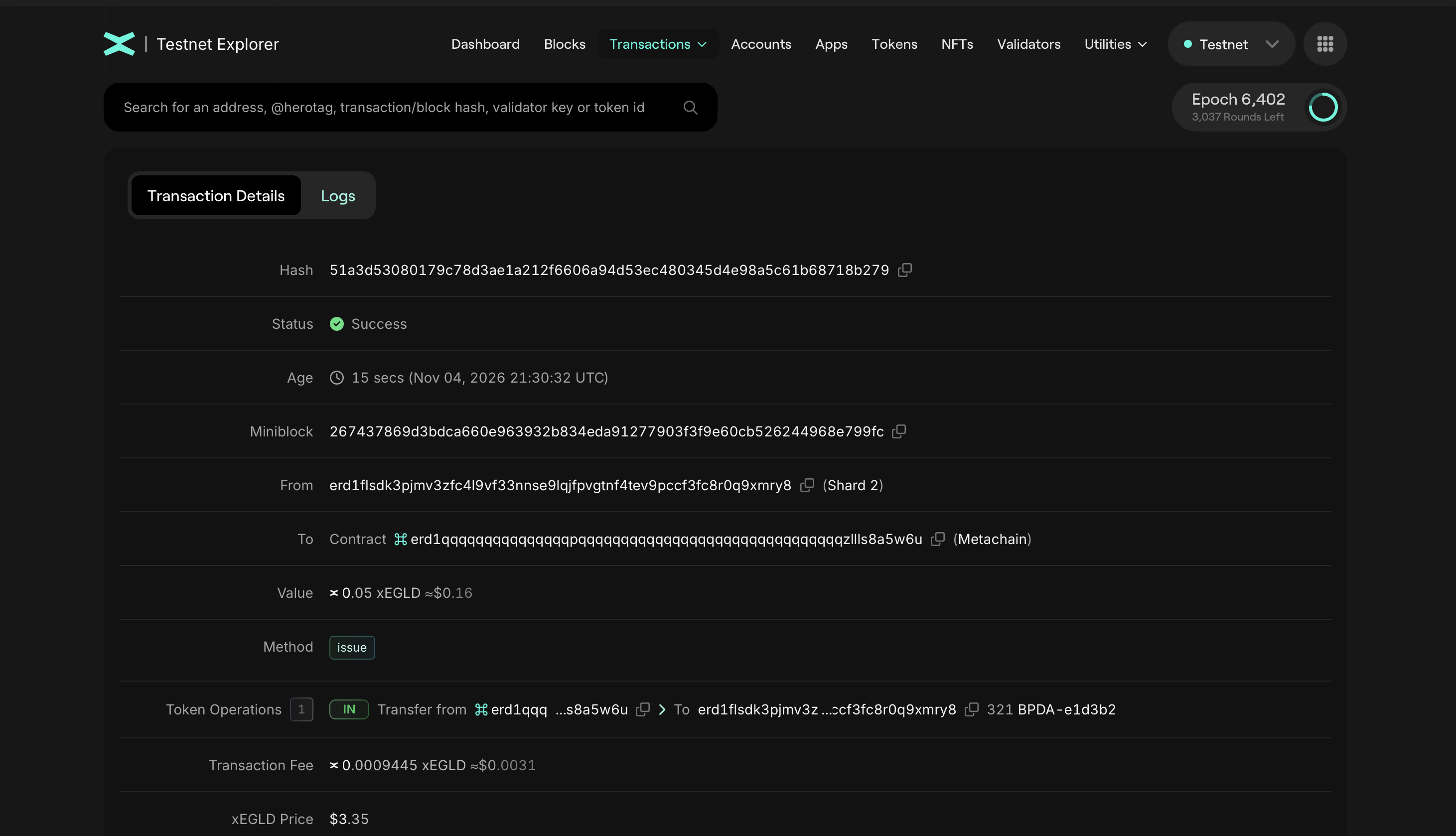
and inspect the transaction
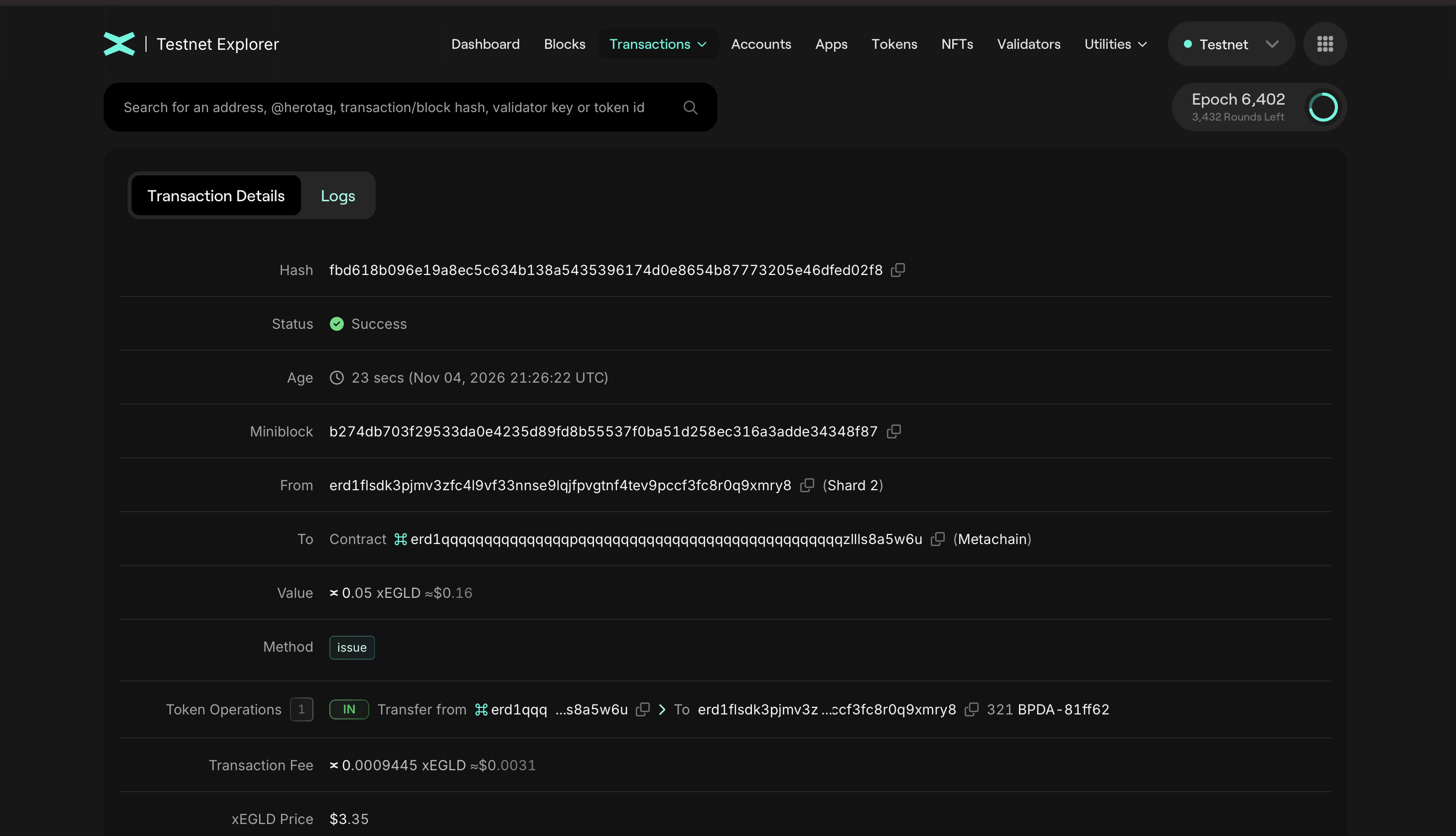
Observe Token Operations field. We received 321.00 BPDA-208994 tokens. BPDA-208994 is the token ID. The token ID is formed by appending to the token ticker the character - and 6 random hexadecimals characters. This is done because there might be mutiple tokens with the same ticker; the token ID is always unique.
We can click on the token ID and see the details of the token:
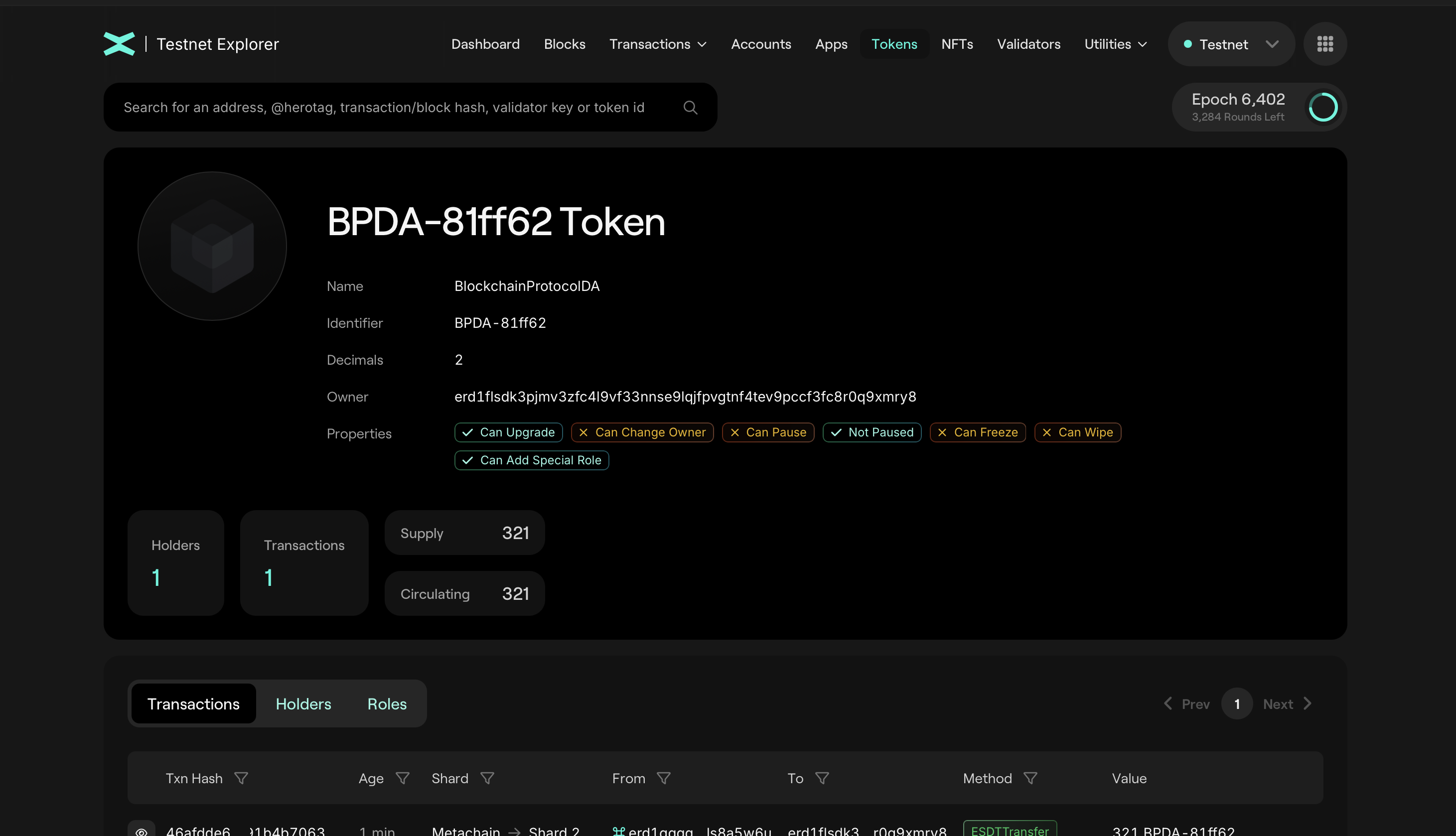
Observe the fields TOKEN, Supply, Holders, Transactions, Owner, Decimals.
Let create another token with the same input:
Observe that the token ID is different.
Practice
- Create your own ESDT token;
- Inspect the transaction;
- Create another token with the same ticker. Observer that the token ID is different and unique.
Issuance of fungible ESDT tokens via cmdline on MultiversX
Throughout the lab, you will need to convert values from decimals to hex to ascii, etc. Use this tool to make your job easier.
ESDT tokens are issued via a request to the Metachain, which is a transaction submitted by the Account which will manage the tokens. When issuing a token, one must provide a token name, a ticker, the initial supply, the number of decimals for display purpose and optionally additional properties. The issuance cost is set to 0.05 EGLD.
The receiver address erd1qqqqqqqqqqqqqqqpqqqqqqqqqqqqqqqqqqqqqqqqqqqqqqqzllls8a5w6u is a built-in system smart contract (not a VM-executable contract), which only handles token issuance and other token management operations, and does not handle any transfers. The contract will add a random string to the ticker thus creating the token identifier. The random string starts with “-” and has 6 more random characters (3 bytes - 6 characters hex encoded). For example, a token identifier could look like ALC-6258d2.
Read more about issuance of fungible ESDT tokens here.
Issuance example
mxpy token issue-fungible \
--token-name <TOKEN_NAME> \
--token-ticker <TOKEN_TICKER> \
--num-decimals <DECIMALS> \
--initial-supply <INITIAL_SUPPLY * 10^num-decimals> \
--pem <PATH_TO_WALLET_PEM> \
--proxy="<GATEWAY_URL>" \
--send
Practice
- Issue a token of your own using
mxpy. Choose whatever name and ticker you want. Check the existance of your token via Testnet Explorer.
Hint: Use mxpy --help
Mint fungible ESDT tokens via cmdline
Actions issue and mint are distinct! First, one must issue the token to exist on the blockchain. Second, the owner/issuer of the token must mint tokens.
The transaction to mint tokens is:
mxpy token local-mint \
--token-identifier <TOKEN_ID> \
--supply-to-mint <SUPPLY_TO_MINT> \
--proxy=<GATEWAY_URL> \
--pem <PATH_TO_WALLET_PEM> \
--send
Note that the sender and the receiver are the same address, which is the creator of the token. After this transaction, he will receive in his wallet the minted tokens.
Practice
- Use the token created at the previous section to mint some tokens. Verifiy on the Testnet Explorer and in your wallet.
Setting ESDT Roles
Notice the Properties section in a Token page.

There are several roles assigned to a token. To change those roles we need to make a blockchain transaction:
mxpy token set-special-role-fungible \
--{ROLE} \
--token-identifier <TOKEN_ID> \
--user <YOUR ADDRESS> \
--proxy=<GATEWAY_URL> \
--pem <PATH_TO_WALLET_PEM> \
--send
Hint: Use mxpy token set-special-role-fungible --help to view a list of available roles.
Practice
- Observe the roles of your newly created token.
- Add ESDTRoleLocalMint and ESDTRoleLocalBurn for your address.
- Mint 1000 tokens.
You can read more about roles in the documentation.
Burning ESDT Tokens
Anyone that holds an amount of ESDT tokens may burn it at their discretion, effectively losing them permanently. This operation reduces the total supply of tokens, and cannot be undone, unless the token manager mints more tokens.
Do you have roles for burning?
mxpy token local-burn \
--token-identifier "<TOKEN_ID>" \
--supply-to-burn "<SUPPLY_TO_BURN>" \
--proxy="<GATEWAY_URL>" \
--pem "<PATH_TO_WALLET_PEM>" \
--send
Don't worry, you can delete the BURN role! Find out how by running mxpy token --help and looking for the relevant command.
Practice
- Burn 500 tokens
Other actions for ESDTTokens
Pausing and Unpausing
The manager of an ESDT token may choose to suspend all transactions of the token, except minting, freezing/unfreezing and wiping. Check more details here.
Freezing and Unfreezing
The manager of an ESDT token may freeze the tokens held by a specific Account. As a consequence, no tokens may be transferred to or from the frozen Account. Freezing and unfreezing the tokens of an Account are operations designed to help token managers to comply with regulations. The manager of an ESDT token may choose to suspend all transactions of the token, except minting, freezing/unfreezing and wiping. Check more details here.
Wiping
The manager of an ESDT token may wipe out all the tokens held by a frozen Account. This operation is similar to burning the tokens, but the Account must have been frozen beforehand, and it must be done by the token manager. Wiping the tokens of an Account is an operation designed to help token managers to comply with regulations. The manager of an ESDT token may choose to suspend all transactions of the token, except minting, freezing/unfreezing and wiping. Check more details here.
Extra
How to convert a JSON keystore into a PEM wallet
A PEM wallet file is a plain-text file containing an unencrypted private key used to sign transactions on the MultiversX network. Unlike a JSON keystore, which encrypts your private key behind a password, a PEM file allows immediate access to the private key without requiring interactive password prompts.
Use PEM wallets exclusively in Testnet and Devnet environments.
mxpy wallet convert \
--in-format keystore-mnemonic \
--infile <PATH_TO_KEYSTORE_JSON> \
--outfile <NEW_FILENAME> \
--out-format pem